How to Get Found on Google: A Practical Guide to SEO
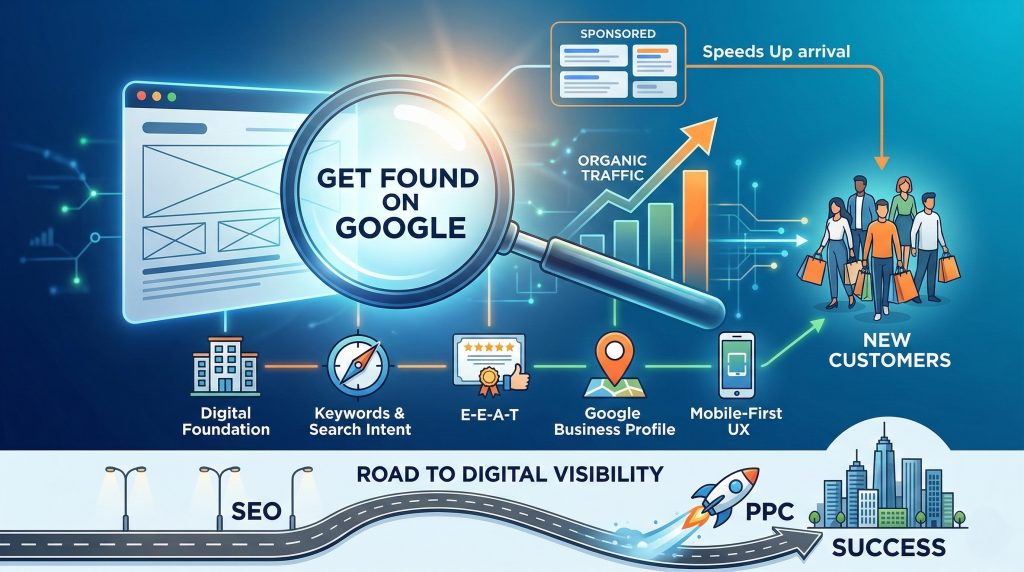
If you’ve ever Googled your own business and wondered why you’re not showing up, or why a competitor with a worse product ranks above you, this guide is for you.
You don’t need to become a marketing expert. But understanding a few core principles can change how your website performs, how your ads spend money, and ultimately how many new customers find you on Google.
Let’s start from the beginning.
SEO (Search Engine Optimization) is the process of making your website easy for Google to find, understand, and recommend to people who are searching for what you offer.
When someone searches “best electrician near me” or “emergency plumber in Austin,” Google scans thousands of websites in seconds and ranks them in order of relevance and trustworthiness. The businesses that show up at the top aren’t there by accident, they’ve given Google good reasons to trust them.
The traffic you earn this way is called organic traffic: visitors who found you naturally, without you paying for an ad. Good SEO means more organic traffic, and more organic traffic means more customers who are already looking for exactly what you sell.
A keyword is the specific word or phrase someone types into Google when they’re searching. Your job is to use those same words on your website so Google can match your page to their search.
There are two types to know:
Primary keywords are your main focus : usually broad terms that describe what you do. These go in your most prominent headline.
Example: Paid Search Management for Small Businesses
Secondary keywords are supporting terms that add context.
Example: Google Ads audit, lead generation strategy, conversion rate optimization, local PPC expert
Tip:Use keywords naturally, write for the person reading your page, not the search engine crawling it.
When your website appears on Google, it shows up in three parts:
That paragraph below is your first impression. It’s the summary that convinces someone to click your link over the four others on the page. If you don’t write one, Google will pull a random sentence from your page, and it rarely looks good.
Rules for a strong Meta Description:
Think of your webpage like a non-fiction book. Your headers are the table of contents: they tell both readers and search engines what each section is about and which parts matter most.
H1 (The Book Title): The main headline of your page. Use only one per page, and always include your primary keyword here.
H2s (Chapter Titles): These break your content into main sections. Use as many as you need.
H3s (Sub-sections): Used to break down an H2 into smaller, more specific points.
Example:Scaling a Service Based Business
H1: How to Scale a Local Service Business
H2: Market Positioning
H2: Lead Generation Strategy
H2: Conversion Optimization
A clear header structure helps Google understand your content, and helps busy readers quickly scan your page to find what they need.
Every image on your website should have alt text: a short written description of what the image shows.
Search engine crawlers can’t see images the way humans do. They rely on alt text to understand what’s in a photo. Without it, Google may skip your image entirely, and screen readers used by visually impaired visitors will read out a useless file name like IMG_5678.jpg instead.
Think of alt text as describing a photo to someone over the phone. Be specific, be natural, and mention relevant keywords where they fit organically.
Example:“A Google Ads dashboard showing a 25% increase in monthly lead conversions for a local service business.”
Google doesn’t just rank pages by relevance, it evaluates whether your website can actually be trusted to give people good information.
This framework is called E-E-A-T, and it stands for:
Experience (“I’ve done it”): Real world, hands-on involvement in your field. Show this through case studies, photos of your work, and personal stories.
Expertise (“I’ve studied it”): Formal knowledge and credentials. Show this through degrees, certifications, and licenses displayed on your site.
Authoritativeness (“Others say I’m credible”): Your reputation in your industry. This is built through links from reputable websites, press mentions, and speaking at events.
Trustworthiness (“I’m safe and honest”): The most important pillar. A secure website (HTTPS), clear contact information, honest reviews, and a straightforward “About” page all signal trust.
The rule: if your site feels shady, the other three letters don’t matter. Google will not rank a site it doesn’t trust.
Customer Reviews = #1 signal for trustworthiness.
For small businesses, the Map Pack (the 3 businesses that show up with a map) is more important than the blue links.
Managing Your Business Profile:
User Experience (UX) is about what it feels like to be a visitor on your website. Is your content easy to find? Do you answer their questions quickly? Is it clear what you want them to do next?
A poor experience: slow load times, confusing navigation, walls of text, drives people away. And when people leave quickly, Google notices. High bounce rates signal to Google that your page didn’t deliver what the searcher needed, which hurts your ranking over time.
Mobile-First is closely tied to this. The majority of people searching Google today are doing it from a phone. Google knows this, so it evaluates the mobile version of your site first when deciding how to rank you. If your site isn’t designed to work beautifully on a phone, you’re leaving traffic on the table.
SEO is a long game. Done right, it compounds over time and delivers consistent organic traffic without ongoing ad spend. But it can take months to see meaningful results, and if you need customers now, waiting isn’t a strategy.
That’s where PPC (Pay Per Click) comes in.
When you search on Google and see results marked Sponsored at the top of the page , those are PPC ads. Businesses bid to have their ad shown when someone searches a keyword related to their service. You only pay when someone actually clicks.
PPC platforms include Google Ads, Microsoft Bing Ads, and social media platforms like Facebook, Instagram, and Reddit.
The key benefits:
Most business owners think of SEO and PPC as a choice. But the most successful businesses use both. And there’s a specific reason to build your SEO foundation before launching paid ads.
Google doesn’t just show the highest bidder. It evaluates the quality and relevance of the page your ad is pointing to. If your website is well structured, uses the right keywords, and provides a good user experience, Google gives your ad a higher Quality Score: which actually lowers your Cost Per Click (CPC) and increases how often your ad gets shown.
Most business owners think raising bids fixes underperforming ads. In reality, improving landing page relevance often lowers costs and increases conversions faster than increasing budget.
In other words: good SEO makes your PPC cheaper and more effective.
PPC brings people to the door. SEO and UX make them stay. If your landing page is well built and answers their questions, a click is far more likely to turn into a customer.
There’s also a visibility advantage. If you rank organically and have a paid ad on the same search results page, you dominate the digital real estate. You become the obvious choice.
Think of your digital marketing this way:
Most successful businesses use all three in concert. The goal isn’t to choose between SEO and PPC – it’s to have a strategy that makes each one stronger.
Now that you know what Google is looking for, try looking at your website through their eyes.
Open your site on your phone and check three things:
Remember digital marketing success is less about tricking an algorithm and more about being the most helpful, most trustworthy option available. Start there, and the rankings usually follow.
If you run into a roadblock or aren’t sure where to start first, feel free to reach out! I’m always happy to point a fellow business owner in the right direction.
Book Your Free 20-Minute Growth Chat