.avif)

When you hand over the keys to your Google Ads account, you expect expert steering. You assume your account manager is in the trenches daily, optimizing bids, testing copy, and fiercely protecting your budget.
But if you’ve recently found yourself searching for “why is my PPC agency not getting results,” you are not alone.
When I run audits on supposedly “professionally managed” accounts, the reality is often shocking. Millions of dollars are lost every year not because of complex algorithm shifts, but because of foundational neglect. Last quarter, I audited an account spending $30K/month where the last manual change was more than 4 months old, despite the client paying a monthly $3K “management fee.”
If you suspect your current setup is wasting budget, here are the five biggest Google Ads red flags I uncover—and exactly how you can check your account yourself.
Want to know if your agency is actually doing the work? The very first place you should look when auditing your Google Ads performance is your account’s Change History. If you are paying a monthly management fee, your account should be actively managed. Yet, when I click into this report, I frequently find a ghost town.
If it has been months since a manual change has been implemented, your account is not being actively managed. It was built, set to run, and left on autopilot.
One of the most common and necessary manual changes in any actively managed account is “negative keywords added.” Because user search behavior constantly changes, a good manager should be reviewing search terms and adding negative keywords to prevent wasted spend. If you don’t see this happening, your budget is bleeding.
Following up on the Change History check—when and what negative keywords are added, and how is it being done? One of the most common signs of a mismanaged account is a lazy, boilerplate list of negative keywords pasted in on day one and never touched again.
While blocking words like “free,” “cheap,” or “jobs” is a fine starting point, a generic template completely ignores the nuances of your specific industry. Worse, these copy-and-paste negative lists often inadvertently block highly qualified, profitable traffic because no one took the time to understand the actual business model.
Imagine paying $30 for a click that leads to a “Call Now” button—only the user is clicking it at 2:00 AM on a Sunday, and your call center is closed. I routinely find call-only ads running 24/7 without ad scheduling (dayparting) in place, or local service businesses accidentally targeting the entire country because a location setting was left on “Presence or interest.”
But asleep-at-the-wheel targeting isn’t just about when or where your ads run—it’s about what the algorithm is aiming for. I frequently see campaigns set to a “Maximize Conversions” bid strategy, where the primary conversion action is just tracking standard website “clicks.” If the algorithm is given the wrong instructions, it will efficiently waste your money on low-intent actions.
You write an incredibly compelling ad offering a 20% discount on a specific product. The user clicks… and is dumped onto your generic homepage. They can’t find the offer, they have to hunt for the product, and they bounce within three seconds.
Just last month, I audited an account where they had a campaign perfectly set up to promote one specific service, but the landing page they were sending traffic to was for a completely different service offer. By simply aligning the landing page to the ad, we saw an immediate 2x increase in conversion rate and a significant decrease in CPC and CPA metrics.
Landing page mismatch destroys conversion rates and tanks your Google Ads Quality Score (which ultimately means you pay a penalty on every click). If an ad makes a specific promise, the landing page must immediately deliver on that exact promise.
This is one of the most concerning finds. Honestly, it pisses me off every time I see it, and it constantly reminds me why a completely different approach to PPC management was needed in this industry. It brings us right back to that Change History report we checked in the very first step.
Many agencies charge a retainer fee based on a percentage of your total ad spend (e.g., 10% of spend, with a minimum spend tier). More often than I’d like to admit, I uncover automated scripts running in the background with one sole purpose: artificially inflating bids and daily budgets just to make sure the campaigns hit the exact spend levels required to justify the agency’s fee tier.
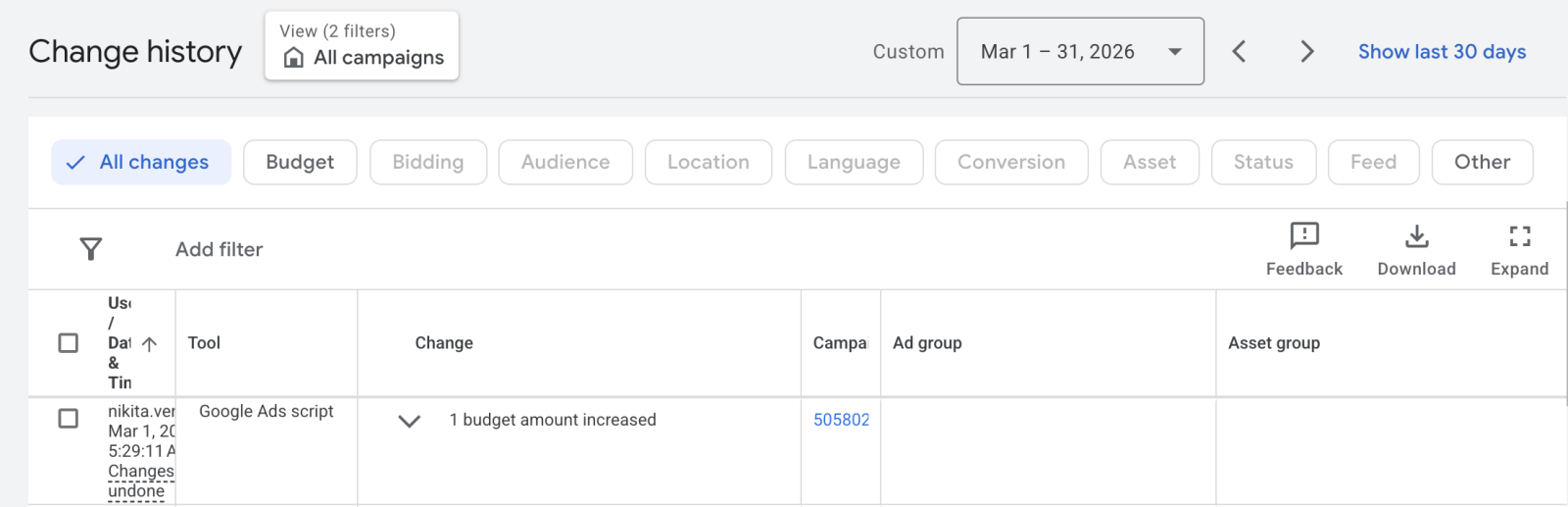
If you look at your Change History and notice that the only recent activity lists “Google Ads script” in the Tool column—rather than “Web client,” which indicates a manual, human update—your account isn’t being actively managed. Instead of pacing the budget based on market demand or pausing when the Cost Per Acquisition (CPA) gets too high, a script is forcing the account to spend your money just to protect their invoice.
If you haven’t had a third party look at your Google Ads account recently, you might be funding these exact mistakes. Don’t wait for your ROI to flatline. Based on historical work, it is common to identify 30%+ in recoverable budget waste. Open up your Change History, check your ad schedules, verify your conversion actions, and if things look suspiciously quiet, it might be time to bring in a dedicated Growth Partner for a comprehensive, no-nonsense audit.
Book Your Free 20-Minute Growth Chat